





What is Phishing?
Phishing is a type of cyberattack in which criminals impersonate trusted organisations or individuals to trick people into revealing sensitive information. Phishing attacks are commonly carried out through fraudulent emails, text messages or fake websites designed to steal passwords, financial details and other personal information.
Phishing remains one of the most common forms of cybercrime, affecting individuals and businesses of all sizes. A successful phishing attack can result in financial loss, identity theft, data breaches and unauthorised access to sensitive accounts. Understanding how phishing works and how to recognise the warning signs is essential for protecting yourself and reducing the risk of cyber fraud.
What is a Phishing Attack?
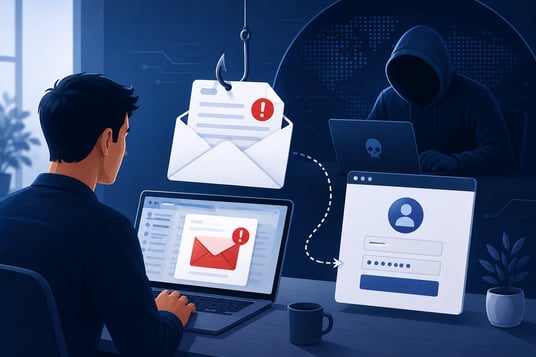
A phishing attack is a cybercrime in which attackers use deceptive emails, text messages, phone calls or fraudulent websites to trick individuals into revealing sensitive information or downloading malicious software. These attacks are designed to appear legitimate, often impersonating trusted organisations such as banks, government agencies, online retailers or well-known brands.
The goal of a phishing attack is to steal valuable information, including usernames, passwords, credit card details and other personal data. In some cases, phishing attacks are used to distribute malware, gain unauthorised access to business systems or commit financial fraud. As phishing techniques continue to evolve, recognising the warning signs has become an essential part of protecting both individuals and organisations.
How Does Phishing Work?
Phishing works by tricking individuals into believing they are interacting with a legitimate person, organisation or website. Attackers create convincing emails, text messages or fake websites that imitate trusted brands, encouraging recipients to click a malicious link, download an attachment or provide sensitive information.
A typical phishing attack follows a simple process:
- The attacker sends a fraudulent email or message impersonating a trusted organisation.
- The message creates a sense of urgency or curiosity to encourage immediate action.
- The recipient clicks a malicious link or opens an attachment.
- The victim is directed to a fake website or unknowingly downloads malware.
- Sensitive information, such as usernames, passwords or payment details, is captured by the attacker.
Understanding how phishing works can help individuals and businesses recognise suspicious activity before sensitive information is compromised.
How to Spot a Phishing Email
Phishing emails are designed to look legitimate, making it difficult to distinguish them from genuine communications. However, there are several warning signs that can help you identify a phishing email before clicking a link or sharing sensitive information.
Common signs of a phishing email include:
- Suspicious sender address – The email may appear to come from a trusted organisation but uses a misspelled or unfamiliar domain.
- Urgent or threatening language – Attackers often create a sense of urgency by claiming your account will be suspended or immediate action is required.
- Unexpected links or attachments – Be cautious of emails asking you to download files or click links, especially if you were not expecting them.
- Requests for personal information – Legitimate organisations rarely ask for passwords, payment details or sensitive information via email.
- Poor spelling or grammar – Many phishing emails contain spelling mistakes, awkward wording or inconsistent branding.
- Generic greetings – Messages beginning with phrases such as "Dear Customer" instead of your name may indicate a phishing attempt.
If you are unsure whether an email is genuine, avoid clicking any links or downloading attachments. Instead, contact the organisation directly using its official website or customer service channels to verify the request.
How to Prevent Phishing Attacks
- Think before clicking – Avoid clicking links or downloading attachments from unexpected or suspicious emails.
- Verify the sender – Check the sender's email address carefully, as attackers often use domains that closely resemble legitimate organisations.
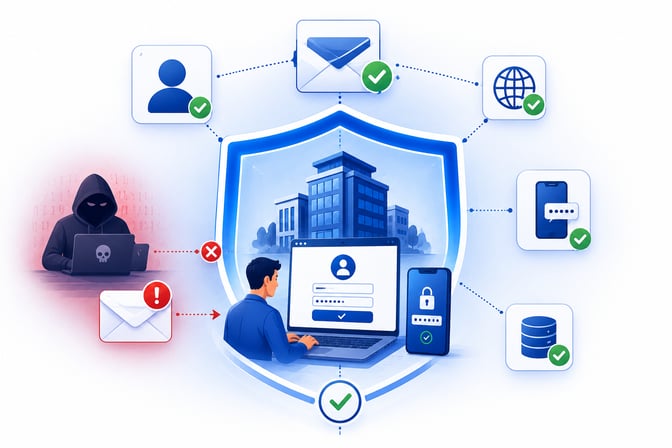
- Enable multi-factor authentication (MFA) – Adding an extra layer of security makes it more difficult for attackers to access accounts, even if login credentials are compromised.
- Keep software up to date – Regularly updating operating systems, browsers, and security software helps protect against known vulnerabilities.
- Verify email addresses during customer onboarding – Businesses can use email verification to validate email addresses, confirm domain and mailbox status, and identify invalid, disposable or suspicious email addresses. This helps reduce fraudulent registrations, improve customer data quality and strengthen account security.
By combining employee awareness, strong security practices and email verification, organisations can reduce the risk of phishing-related fraud while protecting both customer data and business systems.
What is Spear Phishing?
Spear phishing is a targeted form of phishing in which attackers tailor their messages to a specific individual, organisation or department. Unlike traditional phishing campaigns that are sent to thousands of recipients, spear phishing attacks use personalised information to make fraudulent emails appear more convincing and increase the likelihood of success.
Attackers often research their targets using publicly available information, social media profiles or previous data breaches. They may impersonate a colleague, supplier or trusted organisation and include details such as names, job titles or recent business activities to gain the recipient's trust.
Because spear phishing emails are highly personalised, they can be more difficult to detect than traditional phishing attempts. Businesses can reduce the risk of spear phishing by providing employee security awareness training, implementing multi-factor authentication (MFA) and encouraging staff to verify unexpected requests before sharing sensitive information or making financial transactions.
Frequently Asked Questions
What Is a Phishing Email?
A phishing email is a fraudulent message designed to trick recipients into revealing sensitive information or clicking malicious links. These emails often impersonate trusted organisations, such as banks, online retailers or government agencies, to appear legitimate and encourage immediate action.
What Should You Do If You Receive a Phishing Email?
If you receive a phishing email, do not click any links, download attachments or provide personal information. Report the email to your IT department or email provider, then delete it. If you believe you have already interacted with the email, change your passwords immediately and monitor your accounts for suspicious activity.
How to Report a Phishing Email?
If you suspect an email is a phishing attempt, report it using your email provider's built-in reporting feature or notify your organisation's IT or security team. Reporting phishing emails helps prevent future attacks and protects other users from becoming victims.
Can Phishing Lead to Fraudulent Account Creation?
Yes. Cybercriminals may use fake, disposable or suspicious email addresses when creating online accounts. While email verification does not prevent phishing attacks, it helps businesses validate email addresses, identify invalid or disposable email accounts and improve customer data quality during customer onboarding. Combined with security measures such as multi-factor authentication and fraud detection, email verification can help reduce fraudulent registrations and strengthen account security.
Melissa - The Address Experts
As the leader in address verification, Melissa combines decades of experience with unmatched technology and global support to offer solutions that quickly and accurately verify addresses in real-time, at the point of entry. Melissa is a single-source vendor for address management, data hygiene and pre-sorting solutions, empowering businesses all over the world to effectively manage their contact data quality.